Spooky Halloween Seamless Patterns
Getting into the Halloween spirit doesn't require a trip to a haunted house; it often starts with the digital assets you choose for your creative projects. Spooky Halloween Seamless Patterns offer a unique way to infuse fun and eerie illustrations directly into your designs without the hassle of manual editing. Whether you are a seasoned graphic designer or a hobbyist creating handmade invitations, these digital papers provide a foundation that is both visually striking and technically reliable.
However, not all digital downloads are created equal. Many creators rush to purchase patterns only to discover they don't tile correctly, lack the necessary resolution for printing, or fail to integrate well with their specific software. Before you download any collection, it is essential to understand what makes a seamless pattern truly effective and how to avoid common pitfalls that can ruin your project's quality.
Understanding the Value of Seamless Tiling
The core feature of Spooky Halloween Seamless Patterns is the ability to repeat indefinitely without visible breaks. This "seamless" property is crucial for backgrounds, wrapping paper, and large-scale prints. When a pattern tiles perfectly, it ensures that your design looks consistent whether it covers a small business card or a massive banner.
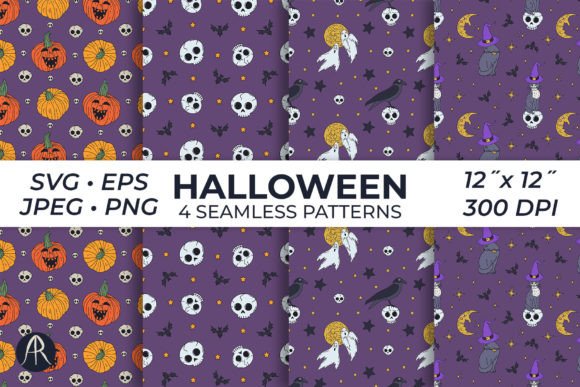
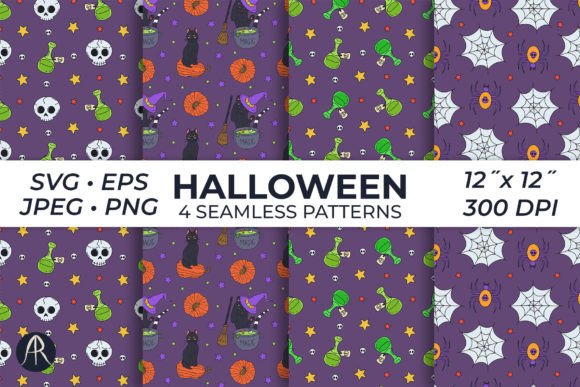
A frequent mistake beginners make is assuming that any repeating image is automatically seamless. Often, users encounter visible grid lines or misaligned edges when they stretch an image to fill a space. This issue creates a disjointed look that undermines the professional quality of your work. To avoid this, always verify that the file is designed to tile edge-to-edge. The collection we are discussing includes four distinct patterns featuring witchy cats, skulls, and pumpkins, all engineered to fit together perfectly.
When evaluating a pattern set, check the preview images carefully. If you see hard lines where the image repeats, the tiling logic is flawed. High-quality files, such as those provided in 300 dpi resolution, ensure that even when you scale the pattern up for a large print job, the details remain crisp and the edges align invisibly.
Common Mistakes in File Selection and Usage
Choosing the right format is just as important as choosing the right design. One of the most overlooked details is the file type. Many users assume that a single file format will suffice for every project, but different tools require different specifications.
- Ignoring Resolution Requirements: If you plan to print your Halloween cards or scrapbook pages, using a low-resolution web image (72 dpi) will result in pixelation. Always ensure your Spooky Halloween Seamless Patterns are at least 300 dpi for print-ready quality.
- Misunderstanding Transparency: Some users expect transparent backgrounds by default. However, many high-quality seamless patterns come as solid JPG or PNG files without transparency. If you need to layer the pattern over another background, you must select the correct file type or be prepared to edit out the background manually.
- Neglecting Vector Formats: For scalable graphics that won't lose quality when resized, vector formats like SVG and EPS are superior. If your project requires resizing a pumpkin illustration from a thumbnail to a billboard, raster images (JPG/PNG) may blur. Ensure your package includes these vector options if scalability is a priority.
Failing to check these technical details can lead to wasted time and money. You might spend hours trying to fix a blurry print or struggling to remove a white background that wasn't supposed to be there. By verifying the file types included—PNG, JPG, EPS, and SVG—you can streamline your workflow and avoid unnecessary frustration.
Maximizing Versatility Across Creative Projects
The true power of these digital papers lies in their versatility. They are not limited to just one type of output. With dimensions set at 12x12 inches, they are perfectly sized for standard scrapbooking layouts, digital card making, and invitation suites. However, their utility extends far beyond the craft table.
Entrepreneurs and small business owners can leverage these patterns for branding materials, social media graphics, and product packaging. Marketers might use them for seasonal email headers, while educators could incorporate them into classroom decorations or learning worksheets. The key is to match the pattern's aesthetic to your audience's expectations.
For example, a pattern featuring cute witchy cats might be perfect for a children's birthday party invitation, whereas a design dominated by skulls might better suit a spooky event flyer for adults. Understanding the mood of each pattern helps you communicate the right message. Don't force a playful cat pattern onto a serious corporate newsletter; let the imagery guide your choice.
Practical Tips for Implementation
To get the most out of your Spooky Halloween Seamless Patterns, consider the following practical approaches:
- Test Before You Commit: Before starting a large project, create a small test swatch. Place the pattern in your intended software to see how it behaves. Check if the colors shift unexpectedly or if the texture looks too busy when placed next to text.
- Layer Strategically: Since the patterns are high-quality and detailed, they can sometimes overpower other elements. Use them as subtle backgrounds or borders rather than filling the entire canvas with dense imagery. This ensures your text remains readable and your focal points stand out.
- Leverage Multiple Formats: Use the SVG or EPS files for logos and icons that need to be scaled, and reserve the high-res PNG or JPG files for final print outputs. Mixing these formats within a single project can save you time and improve efficiency.
By being mindful of these details, you ensure that your final product looks polished and professional. The goal is to enhance your creativity, not struggle against technical limitations.
Evaluating Quality and Completeness
When selecting a digital asset pack, it is vital to look beyond the pretty pictures. A comprehensive package should include everything you need to execute your vision without hunting for additional resources. The ideal set offers multiple file types to accommodate various workflows, ensuring compatibility with everything from basic photo editors to advanced vector software.
Check the resolution and dimensions explicitly. A 12x12 inch file at 300 dpi is the industry standard for high-quality printing. Anything less risks producing grainy results, especially if you intend to print on larger surfaces. Conversely, if you are working exclusively on screens, you might prioritize smaller file sizes, but having the high-resolution version available gives you the flexibility to switch mediums later.
Finally, consider the variety within the set. Having four distinct patterns allows you to mix and match styles to create unique compositions. You might use the pumpkin pattern for the main background and the skull pattern for accents. This variety prevents your design from looking repetitive and adds depth to your visual storytelling.
In summary, Spooky Halloween Seamless Patterns are more than just decorative images; they are functional tools that can elevate your creative output. By understanding the technical requirements, avoiding common file selection errors, and utilizing the diverse formats provided, you can ensure your Halloween projects are both festive and flawless. Take the time to evaluate your needs, choose the right assets, and let these seamless designs bring your spooky ideas to life with confidence.